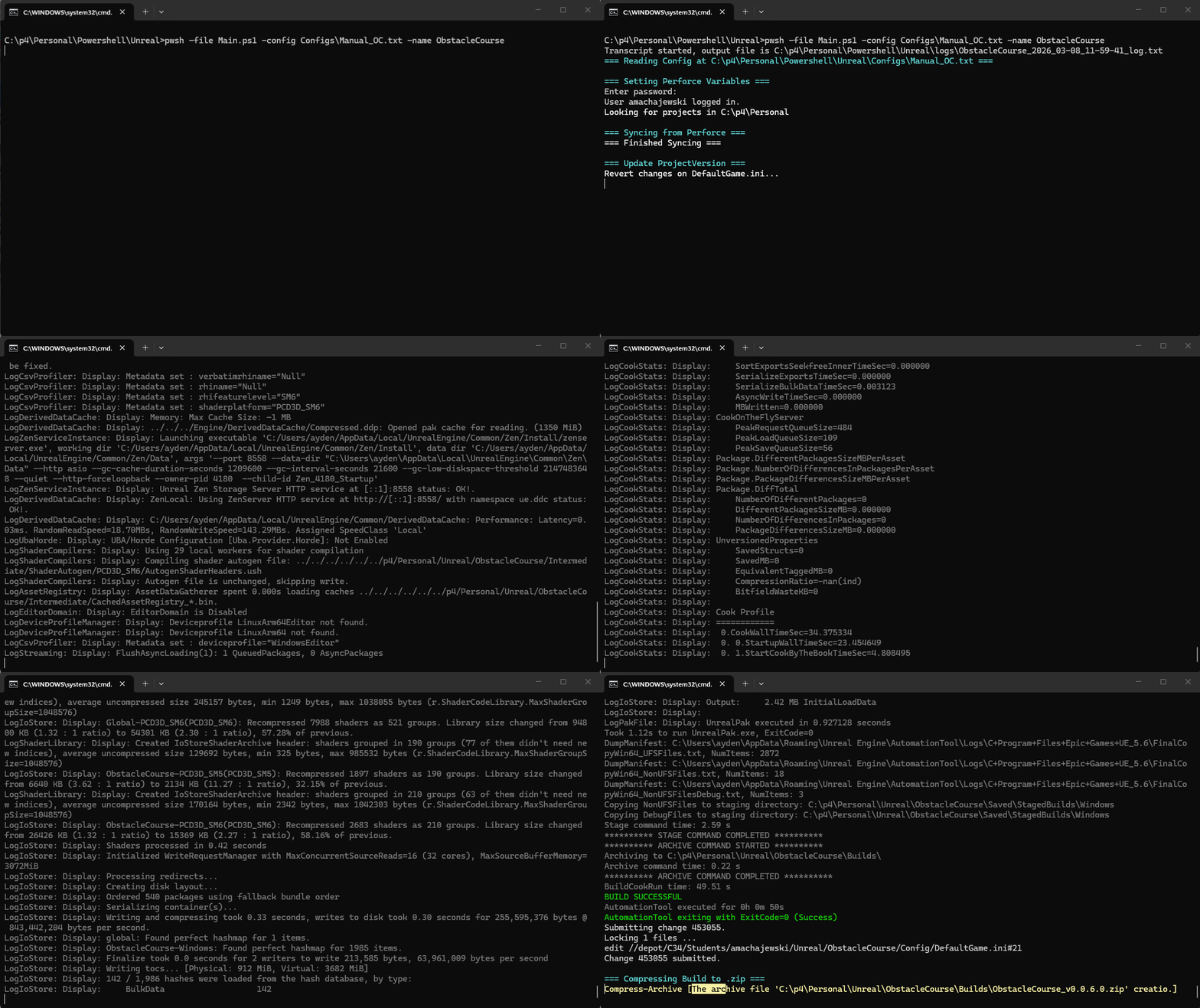
The build machine script running with a test project.
PowerShell Build Machine
September 2025 – March 2026
Windows PowerShell, Perforce, Unreal Automation Tool, Steamworks, Slack API
The PowerShell build machine is a build automation tool I created for use in SMU Guildhall projects made with Unreal Engine. It syncs files from Perforce, builds the Unreal Project, increments it’s version number, uploads the build to Steamworks, archives the build, and reports progress to Slack. It has been robustly documented and is currently in use by an unnanounced project from SMU Guildhall.
The Problems
Historically, SMU Guildhall games have used a Python-based build automation tool that has been passed down for the past several years to automate their build process. Recently, this automation tool had become a point of frustration. For instance, on HardDriverz it took until nearly Alpha for the tool to be setup correctly and in regular use. While working as Lead Programmer on Ling and the Corrupted Hollow, I originally planned to use these scripts. I worked alongside Kila: Keeper of Time Lead Programmer Macrae Smith for about a month, until ultimately we decided that I would try making a new build automation pipeline while Macrae continued to troubleshoot the old script. I identified several points of friction with the original python automation tool that I wanted to address with my new build automation tool:
Script Simplicity: The original tool was split up into several Python files, each responsible for different aspects of the pipeline. This made it unclear to first-time users which scripts were essential and which were optional, and made it more difficult to understand what exactly the script was doing from start to finish. I wanted to make sure any logic in the new tool was contained in a single file as much as possible.
Ease of Setup: To setup the original tool for a project, you had to copy and paste its scripts into a new directory for your project. Some projects would use all of these scripts and others would omit some, so you couldn’t reliably copy and paste from the previous project. This made setting up a new project particularly difficult.
Documentation: The original tool was not well understood and lacked documentation, relying on word of mouth from past Lead Programmers and faculty to new Lead Programmers.
The new tool also needed to have as much feature parity with the old tool as possible.
The Solution(s)
Script Simplicity
I decided to create the new script in PowerShell. I had begun experimenting with PowerShell a bit earlier to automate student builds while working as a Graduate Assistant. The language was just complex enough to handle the customization required for different projects and build settings while still being very simple as an extension of the terminal. I briefly considered breaking out some logic, like the slack reporting functions, into their own script, but decided that having everything in one longer script was still easier to read. This linearity lent itself well to keeping the entire script in a single file.
Ease of Setup
To minimize setup difficulty, I set the script up on SMU Guildhall’s dedicated build machine computers with an explicit folder structure designed to make creating new projects as simple as possible. As part of this structure, only a single instance of the main PowerShell script needs to exist, being at the root of the structure. Instead, users only have to create (or copy-paste) much simpler text config files and short .bat files that connect the desired config to the main script. The setup process was also extensively documented.
Documentation
To ensure that the new automation tool could be as well understood as possible for as long as possible, I created two articles on the SMU Guildhall Confluence Wiki, as well as some brief documentation in the script itself using comments. The bulk of the documentation is found in the Use Guide, a wiki page that describes how to setup a new project for use with the automation tool, as well as some general information. (You can read it either in the embed on the right or here.) I also wrote a Technical Guide with more details on the script’s behavior, coding style, and some recommendations for those who want to modify and/or expand its functionality.
To ensure the documentation was complete, I worked alongside the Lead Programmer for an unannounced SMU Guildhall title, making note of any bugs, gaps in documentation, or other pain points.
Complete Script
# =======================================================================================================
#
# POWERSHELL BUILD SCRIPT
# Version 1.0
# Originally made by Ayden Machajewski (C34 SD) for "Ling and the Corrupted Hollow" and "Kila: Hourbound"
#
# Documentation is available on Confluence: https://smu-guildhall.atlassian.net/wiki/x/AYAGP
#
# BEFORE YOU EDIT THIS SCRIPT:
#   Please DO NOT edit this script without first reading and understanding the Technical Guide available
#   at the link above. If you do edit this script, please update the documentation accordingly and add
#   your name, cohort, and year(s) of contribution to the contributors list below. Don't forget to update
#   the Table of Contents as well!
#
# =======================================================================================================
#
# CONTRIBUTORS:
# C34:
#   Ayden Machajewski (2025-2026):      Created original script v1.0
# C??:
#   ????? ?????? (20XX):                Description of contribution
#
# =======================================================================================================
#
# TABLE OF CONTENTS                         Line #
#   INPUT VARIABLES . . . . . . . . . . . .  50
#   FUNCTIONS . . . . . . . . . . . . . . .  53
#     ParseConfig . . . . . . . . . . . . .  55
#     SLACK FUNCTIONS . . . . . . . . . . .  85
#       GetSlackChannelID . . . . . . . . .  89
#       SlackSendMessage  . . . . . . . . . 140
#       SlackSendFile . . . . . . . . . . . 160
#   MAIN SCRIPT . . . . . . . . . . . . . . 256
#     CONFIG  . . . . . . . . . . . . . . . 264
#       Perforce Config . . . . . . . . . . 276
#       Unreal Config . . . . . . . . . . . 282
#       Build Config  . . . . . . . . . . . 291
#       Steam Config  . . . . . . . . . . . 296
#       Slack Config  . . . . . . . . . . . 310
#     Get Latest from Perforce  . . . . . . 336
#     Increment the Project Version . . . . 366
#     Build the Unreal Engine Project . . . 410
#     Upload to Steamworks  . . . . . . . . 449
#     Push DefaultGame.ini to Perforce  . . 523
#     Compress the build for archival . . . 528
#   HANDLE ERRORS . . . . . . . . . . . . . 559
#
# =======================================================================================================

# INPUT VARIABLES
param( [string]$config="unknown", [string]$name="Unnamed" )

# ===== FUNCTIONS =====
# Returns a hashtable of key-value pairs found in the provided config file.
function ParseConfig {
    param()
    $ConfigPath = Join-Path -Path $PSSCRIPTROOT -ChildPath $config
    Write-Host "=== Reading Config at $ConfigPath ===" -ForegroundColor Cyan
    $ConfigData = @{}
    Get-Content $ConfigPath | ForEach-Object {
        # Trim whitespace
        $_ = $_.Trim();

        # Skip comments
        if ( (-not $_) -or ($_ -like '#*') ) { return }

        # Divide on first '=' delimiter to split key-value pairs
        $Parts = $_ -split '=', 2

        # Process only complete key-value pairs
        if ( $Parts.Count -eq 2 ) {
            $key = $Parts[0].Trim()
            $value = $Parts[1].Trim()
            if ($value.StartsWith('"') -and $value.EndsWith('"')) {
                $value = $value.Substring(1, $value.Length - 2)
            }
            $ConfigData[$key] = $value
            # Write-Host "Reading key-value pair [$key, $value]" -ForegroundColor DarkGray # Only uncomment if debugging; will expose login creditials
        }
    }

    return $ConfigData
}

# ==== SLACK FUNCTIONS ====
# Returns the API ID for a given Slack channel
# We can technically access a channel without the ID, but storing the ID makes it much easier
# (And makes the Slack API much happier)
function GetSlackChannelID {
    param(
        [string]$token,
        [string]$channelName
    )

    $channelName = $channelName.TrimStart('#')
    Write-Host "Looking up channel ID for: $channelName" -ForegroundColor Cyan

    $allChannels = @()
    $cursor = $null

    do {
        $uri = "https://slack.com/api/conversations.list?types=public_channel,private_channel&limit=200"
        if ( $cursor ) {
            $uri += "&cursor=$cursor"
        }

        $response = Invoke-RestMethod `
            -Uri $uri `
            -Method Get `
            -Headers @{ "Authorization" = "Bearer $token" }

        if ( -not $response.ok ) {
            Write-Host "Failed to list channels: $($response.error)" -ForegroundColor Red
            Write-Host "Make sure your token has 'channels:read' and 'groups:read' scopes" -ForegroundColor Red
            return $NULL
        }

        $allChannels += $response.channels
        $cursor = $response.response_metadata.next_cursor

    } while ( $cursor )

    Write-Host "Found $($allChannels.Count) total channels" -ForegroundColor Cyan

    $channel = $allChannels | Where-Object { $_.name -eq $channelName }

    if ( $channel ) {
        Write-Host "Found channel ID: $($channel.id)" -ForegroundColor Green
        return $channel.id
    }
    else {
        Write-Host "Channel '$channelName' not found" -ForegroundColor Red
        Write-Host "Available channels: $($allChannels.name -join ', ')" -ForegroundColor Red
        return $NULL
    }
}

# Sends a slack message the provided slack channel (using the provided auth token).
# See Slack's documentation: https://docs.slack.dev/reference/methods/chat.postMessage/
function SlackSendMessage() {
    param( $token, $channel, $message )

    $Body = @{
        channel = $channel
        text = $message
    }

    Invoke-RestMethod `
        -Uri "https://slack.com/api/chat.postMessage" `
        -Method Post `
        -Headers @{ "Authorization" = "Bearer $token" } `
        -ContentType "application/json; charset=utf-8" `
        -Body ($Body | ConvertTo-Json)
}

# Sends a file to the provided slack channel (using the provided auth token).
# For now, only used for sending .txt file logs that would be too long to send as messages
# See Slack's Documentation: https://docs.slack.dev/reference/methods/files.getUploadURLExternal/
# and also: https://docs.slack.dev/reference/methods/files.completeUploadExternal/
function SlackSendFile {
    param(
        [string]$token,
        [string]$channel,
        [string]$filePath,
        [string]$comment = "Log:"
    )

    # Validate the filepath provided
    if ( -not ( Test-Path $filePath ) ) {
        Write-Host "File $filePath does not exist!" -ForegroundColor Red
        return
    }

    # Parse File Info
    $fileName = [System.IO.Path]::GetFileName( $filePath )
    $fileBytes = [System.IO.File]::ReadAllBytes( $filePath )
    $fileLength = $fileBytes.Length

    # Get upload URL from Slack API
    Write-Host "Step 1: Getting upload URL..." -ForegroundColor Cyan
    $body = @{
        filename = $fileName
        length = $fileLength
    }

    $initResponse = Invoke-RestMethod `
        -Uri "https://slack.com/api/files.getUploadURLExternal" `
        -Method Post `
        -Headers @{ "Authorization" = "Bearer $token" } `
        -ContentType "application/x-www-form-urlencoded" `
        -Body $body

    if ( -not $initResponse.ok ) {
        Write-Host "Failed to get upload URL: $($initResponse.error)" -ForegroundColor Red
        Write-Host $initResponse -ForegroundColor DarkGray
        return
    }

    $uploadUrl = $initResponse.upload_url
    $fileId = $initResponse.file_id
    Write-Host "Upload URL obtained. File ID: $fileId" -ForegroundColor Green

    # Upload the file to the provided URL
    Write-Host "Step 2: Uploading file..." -ForegroundColor Cyan
    try {
        $uploadResponse = Invoke-RestMethod `
            -Uri $uploadUrl `
            -Method Post `
            -Body $fileBytes `
            -ContentType "application/octet-stream"

        Write-Host "File uploaded successfully. $uploadResponse" -ForegroundColor Green
    }
    catch {
        Write-Host "Failed to upload file: $_" -ForegroundColor Red
        return
    }

    # Complete the upload and share via Slack API
    Write-Host "Step 3: Completing upload and sharing to channel..." -ForegroundColor Cyan

    $CompleteBody = @{
        files = @(
            @{
                id = $fileId
                title = $fileName
            }
        )
        channel_id = $channel
    }

    # Only add initial_comment to the body if $comment is not empty
    if ( $comment ) {
        $CompleteBody.initial_comment = $comment
    }

    $CompleteBodyJson = $CompleteBody | ConvertTo-Json -Depth 10
    $CompleteResponse = Invoke-RestMethod `
        -Uri "https://slack.com/api/files.completeUploadExternal" `
        -Method Post `
        -Headers @{ "Authorization" = "Bearer $token" } `
        -ContentType "application/json; charset=utf-8" `
        -Body ([System.Text.Encoding]::UTF8.GetBytes($CompleteBodyJson))

    if ( -not $CompleteResponse.ok ) {
        Write-Host "Failed to complete upload: $($CompleteResponse.error)" -ForegroundColor Red
        Write-Host $CompleteResponse -ForegroundColor DarkGray
        return
    }

    Write-Host "File successfully uploaded and shared to channel!" -ForegroundColor Green
    return $CompleteResponse
}


# ===== MAIN SCRIPT =====
$CurrentVersion = "Unknown"
$LogFile = Join-Path $PSSCRIPTROOT ( "logs/${name}_{0:yyyy_MM-dd_HH-mm-ss}_log.txt" -f (Get-Date) )
Start-Transcript -Path $LogFile -Append
try {
    # ==== CONFIG ====
    # Validate config file
    if ( $config -eq "unknown" )
    {
        # Exit completely (without normal error handling) if the config is missing.
        Write-Host "Please include a config file using the -config argument!" -ForegroundColor Red
        pause
        exit -1
    }

    # Parse and copy config data to easier to use variables.
    $ConfigData = ParseConfig


    # === Perforce Config ===
    $PerforceServer    = $ConfigData["PerforceServer"]
    $PerforceUser      = $ConfigData["PerforceUser"]
    $PerforcePassword  = $ConfigData["PerforcePassword"]
    $PerforceWorkspace = $ConfigData["PerforceWorkspace"]


    # === Unreal Config ===
    $ProjectName           = $ConfigData["ProjectName"]
    $UnrealBuildToolPath   = $ConfigData["UnrealBuildToolPath"]
    $UnrealProjectFolder   = $ConfigData["UnrealProjectFolder"]
    $UnrealProjectFile     = $ConfigData["UnrealProjectFile"]
    $UnrealDefaultGameFile = $ConfigData["UnrealDefaultGameFile"]
    $BuildConfiguration    = $ConfigData["UnrealBuildConfiguration"]


    # === Build Config ===
    $VersionIncrement = $ConfigData["VersionIncrement"]
    $BuildOutputPath  = $ConfigData["BuildOutputPath"]


    # === Steam Config ===
    $SteamEnabled      = $ConfigData["SteamEnabled"]
    if ( $SteamEnabled -eq "TRUE" )
    {
        $SteamCMDPath      = $ConfigData["SteamCMDPath"]
        $SteamUsername     = $ConfigData["SteamUsername"]
        $SteamPassword     = $ConfigData["SteamPassword"]
        $SteamAppID        = $ConfigData["SteamAppID"]
        $SteamDepotID      = $ConfigData["SteamDepotID"]
        $SteamTargetBranch = $ConfigData["SteamTargetBranch"]
        $SteamVDFFile      = Join-Path $BuildOutputPath "app_build_$SteamAppID.vdf"
    }


    # === Slack Config ===
    $SlackEnabled                 = $ConfigData["SlackEnabled"]
    if ( $SlackEnabled -eq "TRUE" )
    {
        $SlackToken                   = $ConfigData["SlackToken"]
        $BuildLogChannel              = $ConfigData["BuildLogChannel"]
        $BuildAnnouncementChannel     = $ConfigData["BuildAnnouncementChannel"]
        $BuildCompleteMessageTemplate = $ConfigData["BuildCompleteMessage"]
        $BuildFailedMessageTemplate   = $ConfigData["BuildFailedMessage"]
        $BuildLogChannelID            = GetSlackChannelID -token $SlackToken -channelName $BuildLogChannel
        $BuildAnnouncementChannelID   = ""

        # Avoid making unnessary calls to Slack API so they don't reject us
        if ( $BuildLogChannel -eq $BuildAnnouncementChannel )
        {
            $BuildAnnouncementChannelID = $BuildLogChannelID
        }
        else
        {
            $BuildAnnouncementChannelID   = GetSlackChannelID -token $SlackToken -channelName $BuildLogChannel
        }

        SlackSendMessage -token $SlackToken -channel $BuildLogChannel -message "Attempting $SteamTargetBranch Build!"
    }


    # === Get Latest from Perforce ===
    Write-Host ""
    Write-Host "=== Setting Perforce Variables ===" -ForegroundColor Cyan
    p4 set P4PORT=$PerforceServer
    p4 set P4USER=$PerforceUser
    p4 set P4CLIENT=$PerforceWorkspace
    echo $PerforcePassword |  p4 login

    # This automatically picks out the Perforce (local) Root from the client info using Regex;
    # "(.+)" pulls out the actual Root path line that we then trim to the path as a string
    $P4ClientRootLine = p4 client -o | Select-String "^\s*Root:\s*(.+)$"
    $PerforceRoot = $P4ClientRootLine.Matches[0].Groups[1].Value.Trim()
    Write-Host "Looking for projects in $PerforceRoot" -ForegroundColor White

    Write-Host ""
    Write-Host "=== Syncing from Perforce ===" -ForegroundColor Cyan
    # & p4 revert $UnrealDefaultGameFile
    & p4 sync "$UnrealProjectFolder/..." 2>$1 | ForEach-Object {
        Write-Host $_ -ForegroundColor DarkGray
    }

    if ( $LASTEXITCODE -ne 0 ) {
        Write-Error "Perforce sync failed with exit code $LASTEXITCODE"
        Write-Host "Consider pulling from Perforce manually using P4V to resolve any issues" -ForegroundColor Yellow
        throw "Perforce sync failed with exit code $LASTEXITCODE"
    }

    Write-Host "=== Finished Syncing ===" -ForegroundColor White


    # === Increment the Project Version ==="
    Write-Host ""
    Write-Host "=== Update ProjectVersion ===" -ForegroundColor Cyan
    Write-Host "Revert changes on DefaultGame.ini..." -ForegroundColor White
    & p4 revert $UnrealDefaultGameFile 2>$1 | ForEach-Object {
        Write-Host $_ -ForegroundColor DarkGray
    }

    Write-Host "Check out DefaultGame.ini..." -ForegroundColor White
    & p4 edit $UnrealDefaultGameFile 2>$1 | ForEach-Object {
        Write-Host $_ -ForegroundColor DarkGray
    }

    # Pull the DefaultGame.ini file and parse its data
    $DefaultGameLines = Get-Content $UnrealDefaultGameFile
    for ( $lineIndex = 0; $lineIndex -lt $DefaultGameLines.Length; $lineIndex++ ) {
        $line = $DefaultGameLines[$lineIndex];
        # Find the ProjectVersion line and parse the versioning
        if ( $line -match "^\s*ProjectVersion\s*=\s*(\d+)\.(\d+)\.(\d+)\.(\d+)\s*$" ) {

            $release, $milestone, $major, $minor = $matches[1..4]
            switch ( $VersionIncrement ) {
                "Release" { $release = [int]$release + 1; $milestone = 0; $major = 0; $minor = 0 }
                "Milestone" { $milestone = [int]$milestone + 1; $major = 0; $minor = 0 }
                "Major" { $major = [int]$major + 1; $minor = 0 }
                "Minor" { $minor = [int]$minor + 1; }
            }

            $CurrentVersion = "$release.$milestone.$major.$minor"
            $DefaultGameLines[$lineIndex] = "ProjectVersion=$CurrentVersion";

            Write-Host "Updated ProjectVersion to $CurrentVersion" -ForegroundColor Green
            break
        }
    }

    # Write the updated Version to DefaultGame.ini
    Set-Content -Path $UnrealDefaultGameFile -Value $DefaultGameLines -Encoding UTF8
    if ( $SlackEnabled -eq "TRUE" )
    {
        SlackSendMessage -token $SlackToken -channel $BuildLogChannel -message "Building Project Version $CurrentVersion..."
    }


    # === Build the Unreal Engine Project ===
    Write-Host ""
    Write-Host "==== Unreal Engine: Building the .uproject ====" -ForegroundColor Cyan
    $UnrealBuildOutput = & $UnrealBuildToolPath BuildCookRun `
        -project="$UnrealProjectFile" `
        -noP4 `
        -platform=Win64 `
        -clientconfig="$BuildConfiguration" `
        -cook -allmaps `
        -build -stage -pak -archive `
        -archivedirectory="$BuildOutputPath"

    # Echo the UnrealEngineOutput to the console (so it also gets logged)
    foreach( $line in $UnrealBuildOutput )
    {
        if ( $line -match "Success" )
        {
            Write-Host $line -ForegroundColor Green
        }
        elseif ( ( $line -match "ERROR" ) -or ( $line -match "FAILED" ) )
        {
            Write-Host $line -ForegroundColor Red
        }
        elseif ( $line -like "(\w*^WARNING*)" )
        {
            Write-Host $line -ForegroundColor Yellow
        }
        else
        {
            Write-Host $line -ForegroundColor DarkGray
        }
    }

    if ( $LASTEXITCODE -ne 0 )
    {
        throw "Unreal Build failed with exit code $LASTEXITCODE."
    }


    # === Upload to Steamworks ===
    if ( $SteamEnabled -eq "TRUE" )
    {
        Write-Host ""
        Write-Host "==== Uploading to Steam ====" -ForegroundColor Cyan
        Write-Host "Note: This can take awhile!" -ForegroundColor White
        Write-Host "Generating Steam .vdf file..." -ForegroundColor White

        # We have to break indentation here to properly create a hash-table from a literal string.
        $SteamVDFContent = @"
"AppBuild"
{
    "AppID"        "$SteamAppID"
    "Desc"         "Automated build $CurrentVersion uploaded $( Get-Date -Format 'yyyy-MM-dd HH:mm:ss' )"
    "BuildOutput"  "$BuildOutputPath\SteamBuildOutput"
    "ContentRoot"  "$BuildOutputPath\Windows"
    "SetLive"      "$SteamTargetBranch"
    "Depots"
    {
        "$SteamDepotID"
        {
            "FileMapping"
            {
                "LocalPath"  "*"
                "DepotPath"  "."
                "recursive"  "1"
            }
        }
    }
}
"@

        Set-Content -Path $SteamVDFFile -Value $SteamVDFContent -Encoding Ascii

        # Send VDF file to steamworks
        Write-Host "Uploading..." -ForegroundColor White
        if ( $SlackEnabled -eq "TRUE" )
        {
            SlackSendMessage -token $SlackToken -channel $BuildLogChannel -message "Uploading Project Version $CurrentVersion to Steam branch `"*$SteamTargetBranch*`"..."
        }

        $SteamUploadOutput = & $SteamCMDPath `
            +login $SteamUsername $SteamPassword `
            +run_app_build $SteamVDFFile `
            +quit

        # Log Steam Upload Result
        $SteamError = ""
        foreach( $line in $SteamUploadOutput )
        {
            if ( $line -like "*ERROR*" )
            {
                Write-Host $line -ForegroundColor Red
                $SteamError = "$SteamError$line "
            }
            else
            {
                Write-Host $line -ForegroundColor DarkGray
            }
        }

        if ( $SteamError )
        {
            Write-Host "Upload to Steam failed." -ForegroundColor Red
            if ( $SlackEnabled -eq "TRUE" )
            {
                SlackSendMessage -token $SlackToken -channel $BuildLogChannel -message "Could not complete upload to Steamworks."
            }

            throw "Steam upload failed: $SteamError"
        }
    } # end if $SteamEnabled


    # === Push DefaultGame.ini to Perforce ===
    $PushDescription = "$ProjectName Build Machine || $name || Auto-Incremented Project Version to $CurrentVersion"
    p4 submit -d $PushDescription $UnrealDefaultGameFile


    # === Compress the build for archival ===
    # Do this last because compression is slow and not as immediately useful as Steam!
    Write-Host ""
    Write-Host "=== Compressing Build to .zip ===" -ForegroundColor Cyan
    if ( $SlackEnabled -eq "TRUE" )
    {
        SlackSendMessage -token $SlackToken -channel $BuildLogChannel -message "Archiving Project Version $CurrentVersion..."
    }

    $CompressionTarget = Join-Path $BuildOutputPath "Windows"
    Compress-Archive `
        -Path "$CompressionTarget\*" `
        -DestinationPath "$BuildOutputPath\${ProjectName}_v$CurrentVersion.zip" `
        -Force


    if ( $SlackEnabled -eq "TRUE" )
    {
	$BuildCompleteMessage = $BuildCompleteMessageTemplate.Replace( "[version]", $CurrentVersion )
    	Write-Host $BuildCompleteMessage -ForegroundColor Green
        SlackSendMessage -token $SlackToken -channel $BuildLogChannel -message $BuildCompleteMessage
    }

    # Finish the log and send it to Slack.
    Stop-Transcript
    if ( $SlackEnabled -eq "TRUE" )
    {
        SlackSendFile -token $SlackToken -channel $BuildLogChannelID -file $LogFile
    }
}
catch
{
    # ==== HANDLE ERRORS ====
    Write-Host "Error: $($_.Exception.Message)" -ForegroundColor Red
    if ( $CurrentVersion -eq "Unknown" )
    {
        $ErrorMessage = "*$SteamTargetBranch Build failed!*";
    }
    else
    {
        "*$Name Build ($CurrentVersion) failed!*"
    }

    $ErrorMessage += "`n$($_.Exception.Message)"
    $ErrorMessage += "`nLogs available in: $LogFile"
    if ( $SlackEnabled -eq "TRUE" )
    {
        SlackSendMessage -token $SlackToken -channel $BuildLogChannel -message $ErrorMessage

        $BuildFailedMessage = $BuildFailedMessageTemplate.Replace( "[version]", $CurrentVersion )
        SlackSendMessage -token $SlackToken -channel $BuildLogChannel -message $BuildFailedMessage
    }

    # Finish the log and send it to Slack.
    Stop-Transcript
    if ( $SlackEnabled -eq "TRUE" )
    {
        SlackSendFile -token $SlackToken -channel $BuildLogChannelID -file $LogFile
    }
}